FAQ

How do I change to a self-pay client and not use my insurance?

Contact our Billing team and they'll send you a insurance waiver.

How to contact our Billing team:
  1. Log into the Client Portal.  
  2. Click on Messages in the menu.
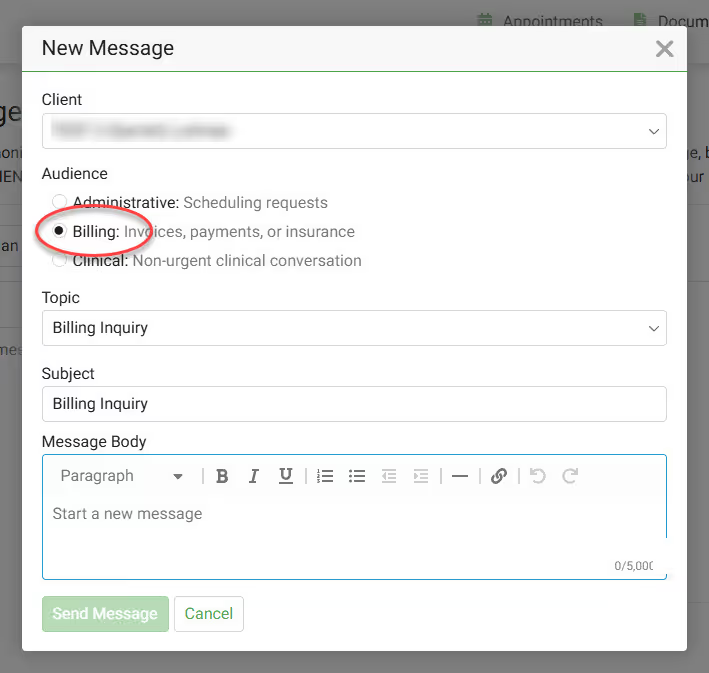
  3. Select New message and select Billing as the audience of that message.
  4. Complete the message with your desired details.
Message our Billing Team

Related Existing Clients FAQs

When are my prescriptions sent to my pharmacy?

Usually, your prescription is sent to the pharmacy by the end of your session or the end of the day.  Please wait for your pharmacy to contact you and let you know when your script is ready for pickup.

What is a prescription prior authorization?

Prior authorization comes from your insurance to verify and/or modify the prescription request sent in by your provider.  The process to complete the prior authorization request can take 2-3 days.

How do I change to a self-pay client and not use my insurance?

Contact our Billing team and they'll send you a insurance waiver.

How to contact our Billing team:

  1. Log into the Client Portal.  
  2. Click on Messages in the menu.
  3. Select New message and select Billing as the audience of that message.
  4. Complete the message with your desired details.
Message our Billing Team

How do I send my medical records to my provider?

If you have records (i.e. Medical Records) that you want to send to your provider at Overcomers, you can email them at support@overcomewithus.com.  You may also visit the Client Portal, click the Documents tab and then click Upload Document.

How do I request another session with my current counselor?

Existing clients have access to the Client Portal to request new sessions!

  1. Log into the Client Portal.
  2. Click on Appointments in the menu.
  3. Click Request Appointment.
  4. Select the Appointment Type (Therapy or a Medication Management).
  5. Select the location from the location dropdown.
  6. Click the View Available Times button.
  1. Select your preferred appointment time.
  2. Review your appointment request details and click the Submit Request button

Want a text message with link to the Client Portal?

In the Client Portal you can:

  • Manage (create, cancel, reschedule) your appointments
  • Join your telehealth sessions
  • Pay for your session fees
  • Change/update your insurance
  • View your treatment plan
  • Message your counselor/NP
  • Message the Support Team (Admin, Scheduling or Billing)
  • And more!