FAQ

How do I access the client portal?

Click here to access our Client Portal.

Related Existing Clients FAQs

How do I change to a self-pay client and not use my insurance?

Contact our Billing team and they'll send you a insurance waiver.

How to contact our Billing team:
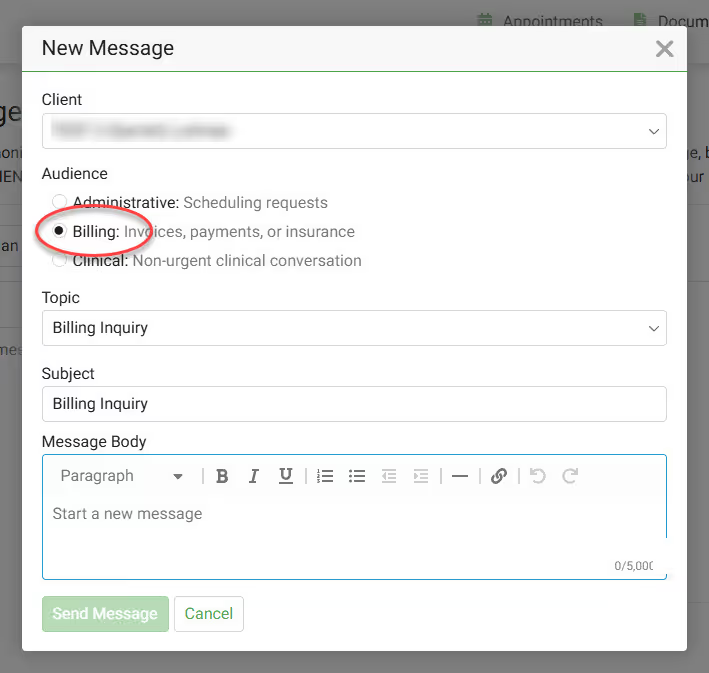
  1. Log into the Client Portal.  
  2. Click on Messages in the menu.
  3. Select New message and select Billing as the audience of that message.
  4. Complete the message with your desired details.
Message our Billing Team

How to make a prescription refill request?

Need an Rx Refill?  Log into the Client Portal to notify your nurse practicioner that you need a refill.  

  1. Click on Messages in main menu.
  2. Click on New message.
  3. Click Clinical as the audience type.
  4. Select Prescription Refill Request from the Topic dropdown

Refills of controlled substances will most often require a session with your provider.  You can continue to complete the request; however, after completing the request, you can proactively take the next step and book a follow-up session with your provider.  

Common controlled substances:

  • Adderall
  • Vyvanse
  • Methylphenidate
  • Lisdexamfetamine
  • Xanax
  • Klonopin
  • Alprazolam
  • Clonazepam
  • Ambien
  • Zolpidem

How do I reset my password on the Client Portal?

To reset your Client Portal password, follow these steps:

  1. Visit the Client Portal.
  2. Click Forgot Password.
  3. Enter your email address and date of birth, then click Continue.
  4. You will be sent an email to validate your account.
  5. Click the link in the email and follow the prompts to create your new password.
  6. After all of the steps are completed, you will be able to log in to your account using your new password.

Can I message or speak to my counselor directly?

Yes, you can! In the Client Portal, you can send a message directly to your provider. Send them messages about:

  1. Details about your week
  2. Let them know you are running late to your appointment,
  3. Can't join your teletherapy session
  4. There are issues in the waiting room of your teletherapy session.
  5. Counselor or NP are not visible in the Client Portal teletherapy session.

If you are unable to access the Client Portal, you can also send a message directly to your provider here.

Quick Message

My Client Portal link expired, how do I request another one?

If the 'Welcome to the Portal' link has expired (it expires in 7 days), our support team or your provider can resend you a new link.  Contacting our Support Team using any of the following methods:

  • Email - support@overcomewithus.com
  • Call - (719) 345-2424
  • SMS - (719) 888-5022