Reimbursement Policy
This policy provides clear guidelines on reimbursement procedures for Office Maintenance, Overcomers EAP, and Professional Development expenses. Please review each policy to understand the specific details and requirements.
Reimbursements for work-related expenses are generally not taxable to the employee.
Categories for reimbursement
Click on each policy to learn the details, maximums and requirements.
How to get reimbursed
Watch this video overview.
- Visit Paylocity (mobile or desktop)
- Click on Expenses in the menu.
- Click Create Expense Report
- Give the Report a Name (an expense report can contain several expenses for reimbursement).
- Click Create Expense
- Give the expense a title
- Select the appropriate category
- Select the transaction date
- Select the payment method
- Enter the amount
- Upload the receipt
- Click save.
- After entering the expenses in the report, click Submit for Approval.
Once Admin reviews and approves your expenses, you’ll be reimbursed on your next paycheck.
Reimbursements on your Paystub
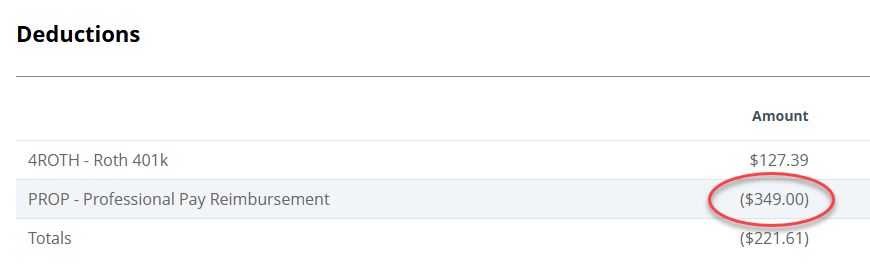
Reimbursements on your pay stub will appear in the Deductions section as a positive number, effectively reducing the total deductions. Here's an example for reference. If there are no deductions, such as 401(k) contributions or health benefits, the reimbursement will instead be displayed under the gross earnings or benefits section.