Treatment Paused Procedures
How to send Treatment Paused msgs for billing issues
This task is assigned weekly on Tues & Thurs.
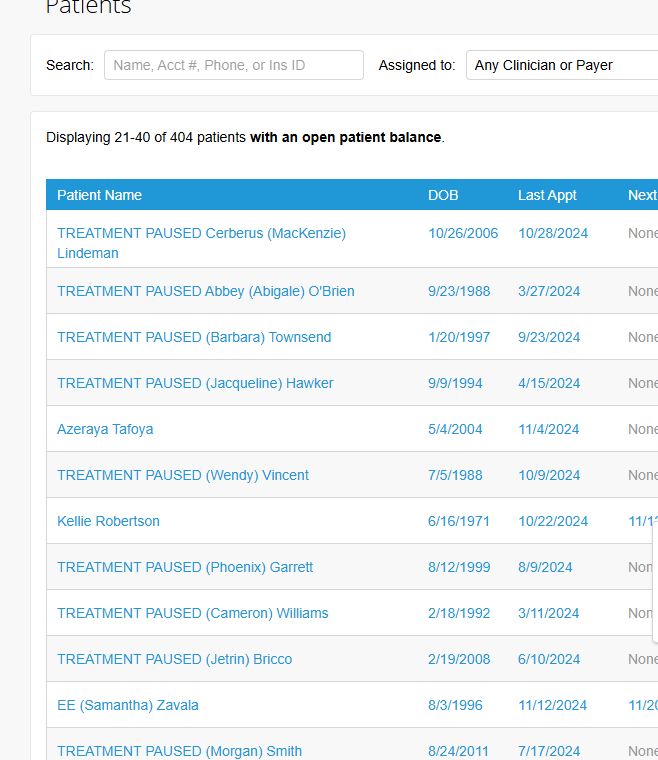
- Go to Patients >> Any Clinician or Payer >> Have Open Patient Balance – Search.
- Sort by Outstanding balance amount (greatest to lowest)
- Click on Select Columns and add the “next appt” column.
- Open all the client's files that have an outstanding balance that meet the below requirements:
- Have an upcoming appointment
- Balance greater than ~$200 OR balance of $20+ that is over 14+ days old
- Check the To-Do section, billing settings and messages tab in the client file
- To-Do Tab: If a payment plan is established, an admin note will be added here, if there is a payment plan established, close the client's file and move on to the next client
- Exercise your discretion. Certain situations may permit a larger balance due to insurance-related issues.
- Add the “TREATMENT PAUSED” text to the Preferred name field in TN.
- Cancel all future sessions. DON’T write a cancellation note.
- Download and upload a statement to the client file IF an accurate statement is not already in the Portal.
- Go to TN Msg and send a msg to the client using the TD canned msg: /tpd
How to un-pause treatment
- When the client responds to the Treatment Pause notice with their option, you’ll need to “un-pause” treatment if the criteria are met.
- Delete the Treatment Paused Admin reminder.
- If the canceled sessions are in the future and the timeslot is still available, they should be reinstated. If they are in the past, no action is needed.
- Send a TN msg to the client (under the same Treatment Paused thread) saying they are sessions have been reinstated and their next appt is XXX OR tell them to rebook by visiting the Appointments tab in the Client Portal.
- Send a msg to the clinician saying that the Treatment Paused has been removed and the client has been notified and they are welcome to rebook.