Sync TherapyNotes Calendar with Google Calendar
To sync YOUR TherapyNotes calendar with a device/program (i.e. Google Calendar):
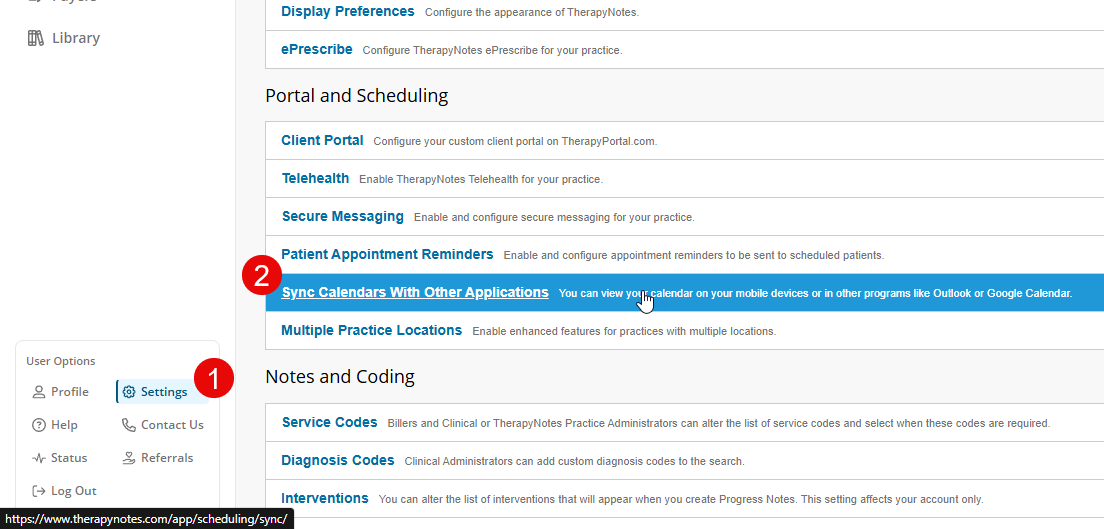
- Click the User Icon > Settings > Sync Calendar With Other Applications
- Under Program- and Device-Specific Instructions, follow the steps for your chosen device or program, or refer to the instructions provided below
Google Calendar
To sync your TN schedule with your Google calendar, copy the calendar link provided on the Sync Your Calendar With Other Applications settings page.
iPhone and Other Apple Devices
To subscribe to your TherapyNotes calendar on your iPhone, visit the calendar link using Safari or your preferred web browser on your iPhone. To do this, we recommend logging in to TherapyNotes on your iPhone, navigating to the Sync Your Calendar With Other Applications settings page, and tapping on the calendar link. Your iPhone will ask you to confirm your subscription to the calendar.
Alternatively, you can open Settings on your iPhone and select Accounts and Passwords. Select Add Account > Other > Add Subscribed Calendar. In the Server field, type in the calendar link as it appears on the Sync Your Calendar With Other Applications settings page.
Android Devices
Android devices load their calendar information through Google Calendar. Follow the Google Calendar instructions to add your TherapyNotes calendar to your Google account, and your calendar will sync to your Android device.