Outstanding Balance Procedure
How to send outstanding balance msg for sessions that occurred 3 days ago OR 6 days ago
Task assigned every day.
- Set the Date Search Criteria to 3 days ago or 6 days ago (depending on which you are working on) from the date the ticket was created.
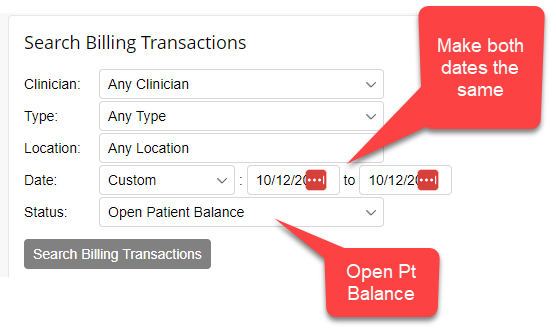
- Open each client’s file in a new tab
- Send a Billing msg in TN Messages with the subject: Outstanding Balance. Use TD shortcode: /obt >> Balance Due, 3 days old or /obt >> Balance Due, 6 days old
- If the client is 17 and under AND the parent/guardian email is NOT the primary email used for the Client Portal, send an FD email to the party responsible for billing, as noted in TN.
- FD Email template name: “Billing: Outstanding Balance on Minor's Account”
How to send outstanding balance msg and statements aged 30+ days
Task assigned on the last week of the month.
If you are receiving this ticket, follow these steps. The ticket will usually be assigned to multiple agents in the last week of the month.
- Go to the Pt Aging Report
- Set the Age to: Over 30 days
- Open up all the clients listed in your ticket in a separate tab. The ticket will say, “... A to F clients…”
- If there is no accurate Billing Statement in the Client Portal:
- Remove outdated billing statement
- Add a current billing statement
- Send outstanding balance TN Messaging (TD shortcode /obt >> Balance Due, 30 days old)
- If there is an accurate Billing Statement in the Client Portal already:
- Send outstanding balance TN Messaging (TD shortcode /obt >> Balance Due, 30 days old)