Insurance Denials
Below are some common causes of insurance denial and solutions.
Intake (90791) Too Soon From Last Intake
The Reason
Usually, this happens when a client is transferred from one clinician to another. Most insurances require at least 1 year from the last 90791 claim and/or a new diagnosis in order to justify another intake assessment.
The Fix
The appointment needs to be changed to a session with 90837 service code and a progress note which means the intake note is no longer needed. The clinician will need to do the following:
- Download the intake note (just for a precaution and to use a reference later)
- Delete the intake note in TN (may require a Clinical Admin role)
- Change the appointment type to “Therapy Session” for the appointment window
- Change the service code to 90837
- Write a progress note for this session (use the intake note as a reference)
- Delete the intake note from your computer
Diagnosis Not Covered
The Reason
The clinician may have used the wrong diagnosis, or the client’s insurance plan specifically denies that diagnosis.
The Fix
Option 1: The clinician changes their diagnosis
Option 2: The client self pays
SUD Diagnosis In Wrong Position
The Reason
The clinician billed 90791, 90837/34/32… and put a SUD diagnosis in the primary position. 90791, and others, are mental health services therefore a mental health diagnosis belongs in the primary position.
The Fix
The clinician will need to move the SUD diagnosing to the second position and put a mental health diagnosis in the primary then claims can be resubmitted.
Wrong Service Code Billed
The Reason
There could be several reasons why the wrong service code was billed. It could be an individual session billed with the couple/family code of 90847. It could be that the EAP appointment was billed with 90791 instead of 99404 for Cigna.
The Fix
The solution is fairly simple but requires the billing dept and the assigned clinical to play a role.
Billing Dept Todo
- Remove the “$0” from the ERA for the session in question. The “Allocation” field should be blank.
Clinician Todo
- Once the billing dept has removed the “$0” you’ll be able to edit the Note Header.
- Go to the session in question
- Click on your note for that session
- Click Edit
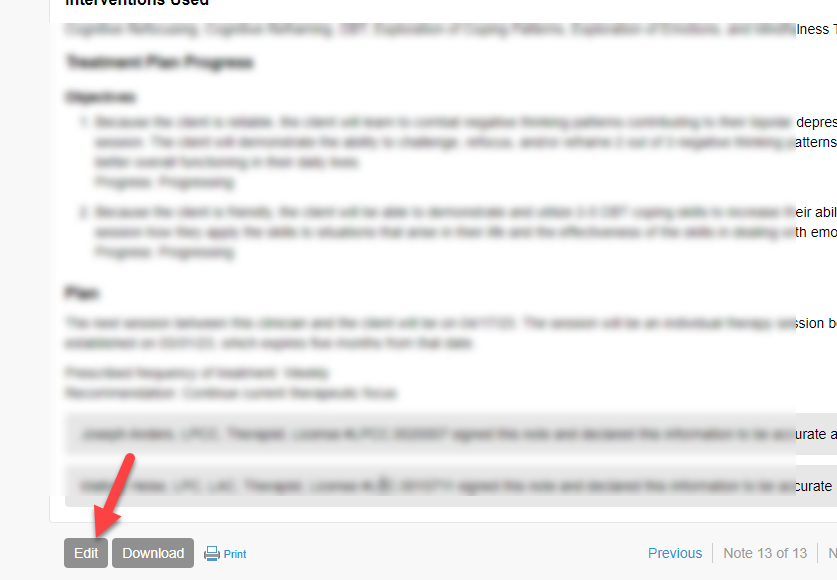
- Edit the Note Header (the Note Header is the top section of your note)
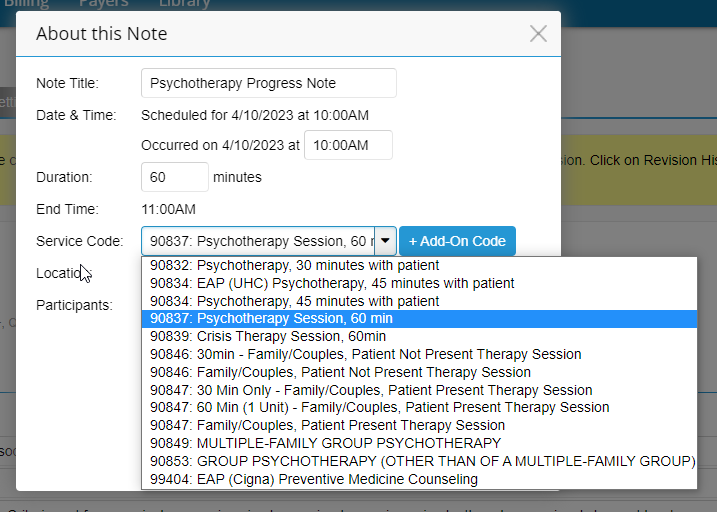
- Change the service code to the appropriate one
- Save. This will trigger the Billing Supervisor to resign the note (if applicable)