How to Schedule Supervision Sessions
All supervision appointments will be scheduled within TherapyNotes. The supervisee will be set up the same way a client is. The supervisee will pay for their supervision session ($40) just as a client would pay - in the client portal. Of course, their fees will be waived if they take advantage of the free supervision options. If they are pursuing the 100+ session month, they can wait to pay, or not pay, their supervision session until the end of the month.
To schedule a supervision session with your supervisee, follow the steps below:
- Go to TherapyNotes
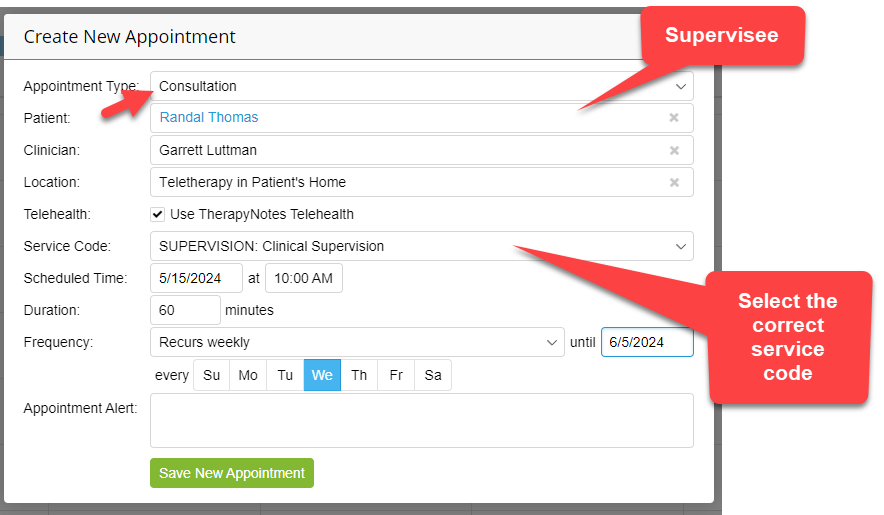
- Appointment Type is Consultation
- The patient is your supervisee
- Location TH
- Service Code is ‘SUPERVISION: Clinical Supervision’ (this is the most critical step)
- The duration will default to 60 minutes; however, you’ll be paid for 2+ units for every 60 minutes scheduled. Increase the duration to 120 minutes to be paid for 2 supervision services ($160).
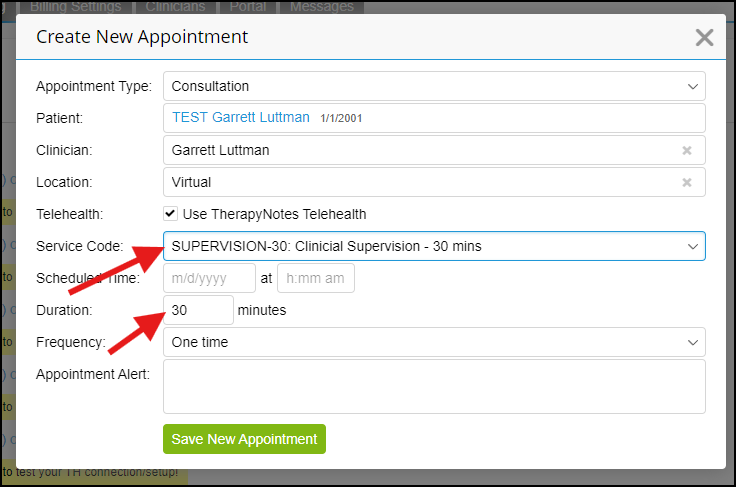
Alternatively, you can schedule a 30-minute consultation. The supervisor is reimbursed $40 per service code for 30-minute consultations, and the supervisee is charged $20. Be sure to select SUPERVISION-30 as your service code.
Please note that this service code is not billed per unit, meaning if you adjust the duration to 60 minutes, you will only be paid for a 30-minute session.
How Supervisees join their Virtual Session
You no longer need to send links to Google Meets. Your supervisee, and yourself, can join the virtual meeting just the same as you would any virtual client session. However, if Google Meets suits you better, that is always an option too. It would be best practice to try and implement the meeting inside TN because other items may come into play down the road inside TN.
You must write a Consultation Note
To document the supervision session, it's necessary to compose a consultation note. This note could be as brief as a single word; however, you have the option to include more detailed information to assist in monitoring your supervisee. The decision on the length and detail of the note is yours. Obviously you would leave the diagnosis (Dx) section empty in the consult note.
Upload any Supervisee Documents
Additionally, while not required, you are encouraged to upload any relevant documents you've been storing to their "client" file in TN. This will facilitate centralized access to all necessary information for everyone (admin) who may or may not need it.
The Benefits
We’ll have a thorough, documented list of supervision sessions.
- You can upload a single document with past supervision sessions (if needed).
- The payroll/accounting burden will be drastically reduced.
- You can “stay” in the same platform, TN, where 90% of day-to-day work is performed.