How to handle Client Portal technical issues
Most Client Portal issues can be resolved by calling the client and discussing the issue. Here are the most common problems and how you can fix them.
Client says, “forgot my password”
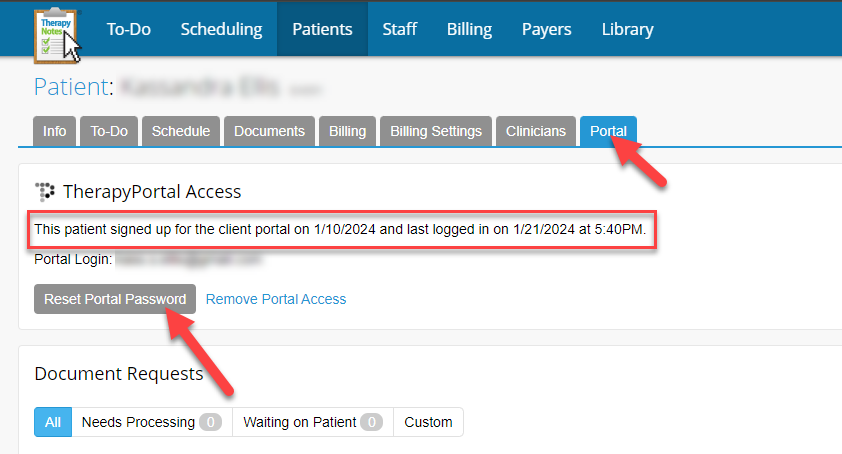
If the client forgot their password and therefore can’t login to the portal, click the “Reset Portal Passwordt”. They’ll get an email to reset their password. Be sure to check the description of when the client last logged in. They may have recently logged in!
Client says, “can’t log in” … “link won’t work”
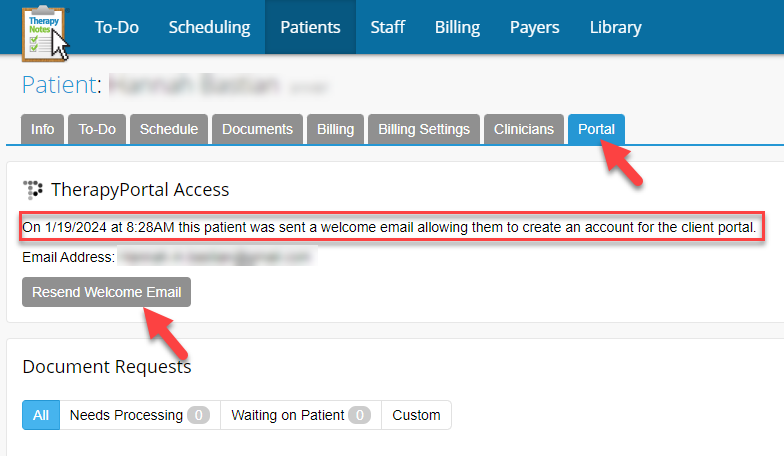
If the client reports that they “can’t log in,” the “link won’t work,” or the “link is expired,” then this means they didn’t set up their Client Portal account within 7 days of the original email. Simply, resend the “Welcome Email.”
Client says, “...there’s no button to join the telehealth session…”
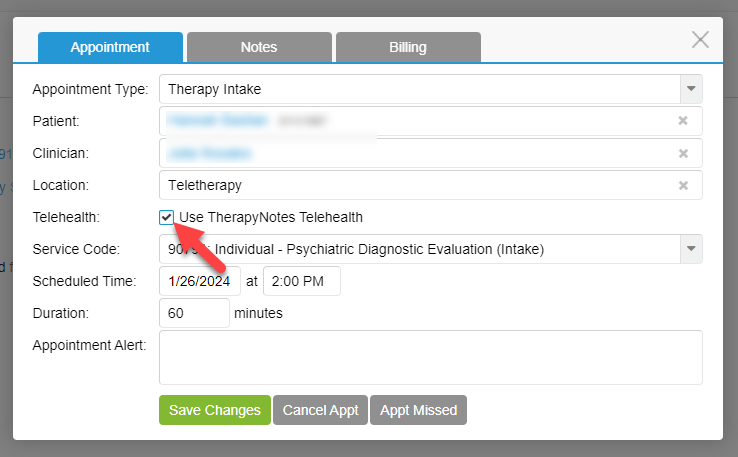
This usually means that the checkbox on the appointment in TherapyNotes was not ‘checked’. Click the box on the appointment window and tell the client to refresh.
Telehealth audio or video issues in the Client Portal
Several factors play a role in audio/video issues. The quickest way to resolve this so you can conduct your session is to send the client a Google Meets link. Go here: https://meet.google.com/ start a new meeting and then email your client the link.