Contact Notes
Contact Notes are non-clinical notes used to document communication between the therapist and a client or a client's contact. This could be about scheduling, homework assignments, billing, and any other communication held outside of the therapy session. There is NO CHARGE to the client for time spent communicating with them about the above issues, therefore there is no revenue earned for the clinician. It’s best to keep calls under 10 minutes.
However, if you’d like to bill the client and/or their insurance for treatment that was conducted over the phone, read this doc: How to bill Teletherapy (Audio Only) Sessions.
Contact Note Example:
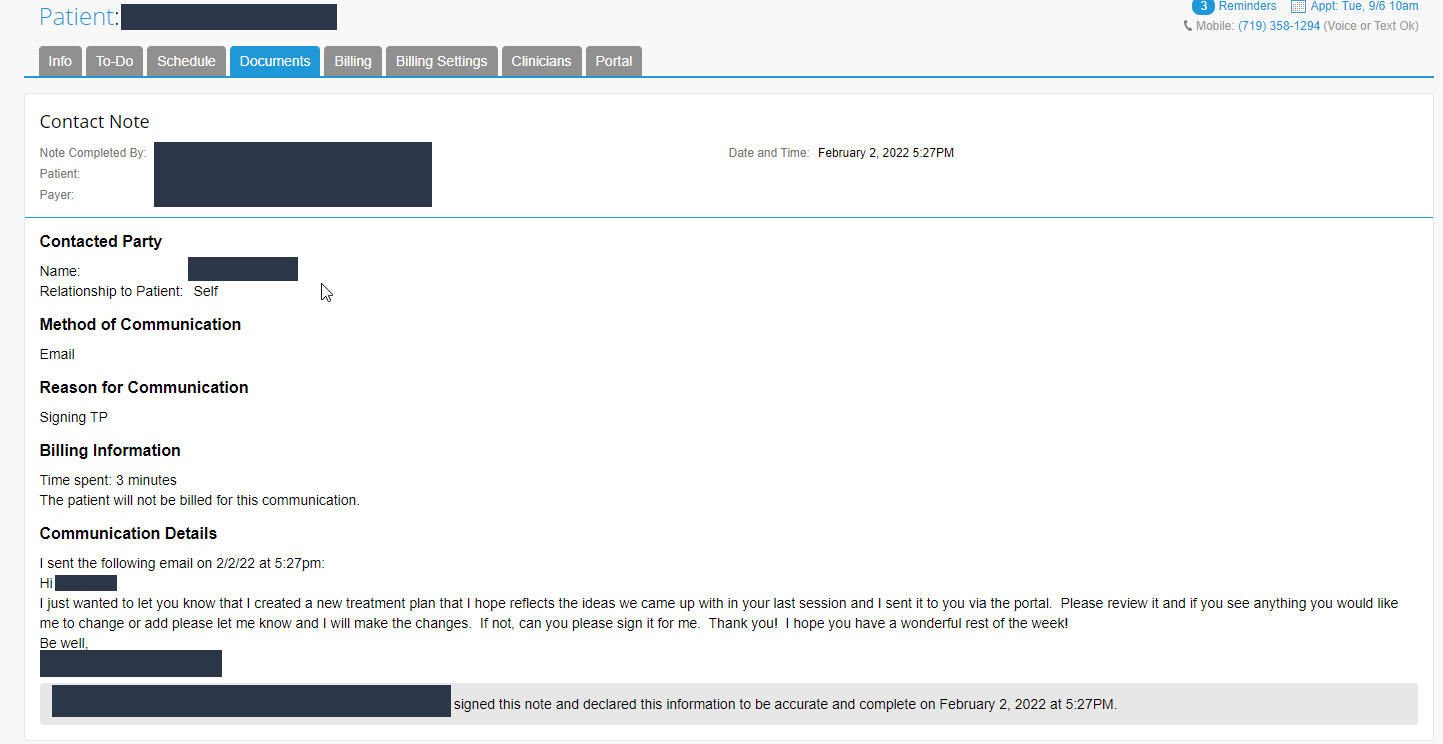
Steps to create a Contact Note in TN
Contact Notes are non-clinical notes used to document communication between a staff member and a client or a client's contact.
To create a Contact Note:
- Click Patients > Patient Name > Documents tab
- Click the Create Note button
- From the list that appears, select Contact Note

The note header automatically fills in information for the client, the client's insurance, the date and time the note was written, and which staff member created the note. To edit information in the note header such as the Note Title or Date & Time, click anywhere on the note header or click Edit in the upper right corner.
Contacted Party

Click in the Name field to select from a list of the client's contacts. Your selection will autofill both the Name and Relationship to Patient fields. Alternatively, enter a Name for a contact that is not included in the client's contacts. Click in the Relationship to Patient field to select from a list of common types of contacts.
Method of Communication

Select how you communicated with the contact. Multiple options may be selected to account for the full exchange with the contact.
Reason for Communication
Click in the Reason for Communication field to select from a list of common responses, or enter a custom reason.
Billing Information

Enter the total number of minutes you spent communicating with the contact across all of the communication methods indicated in the Method of Communication section. There is NO CHARGE to the client for time spent communicating with them about scheduling, homework assignments, billing, therefore there is no revenue earned for the clinician. It’s best to keep calls under 10 minutes.
Communication Details
Enter any details related to the communication, including who contacted whom and what was accomplished through the communication.
Sign and Save
In order to save a Contact Note, you must enter the Name and Relationship to Patient for the Contacted Party, Method of Communication, and Reason for Communication. All other fields are optional.

Once you have completed your Contact Note, select the Sign this Form checkbox to electronically sign the note. Select whether the note should be visible only to clinicians assigned to the client or to all users from the Note is visible to dropdown. Click the Create Note button.
To save an unfinished Contact Note, leave Sign this Form unchecked and click the Save Draft button. You may access your draft later from your To-Do list or click Patients > Patient Name > Documents tab.