401k
Employees will receive an invitation to join Guideline >> Accrue401k >> Vestwell, the company that manages our 401 (k).
Eligiblity
- W2 employees (part time or full time).
How to Enroll / Eligibility Date
Employees are not eligible to participate until 90 days after the hire date.
Generally, within 30 days of an employee's eligibility, they will receive an email notification with their auto-enrolment date. The email will contain information on setting up your Vestwell account or opting out of participation.
Emails will be sent to your personal email (the same email used to manage your paystubs/W2).
Automatic Enrollment
All employer-sponsored plans include automatic enrollment. This feature is designed to encourage more people to save for retirement by automatically enrolling eligible employees into the 401(k) plan. If you do not wish to participate, you can always opt out.
However, if you don’t set up your account or opt out before the date provided in your enrollment invitation email, you will be automatically enrolled in your 401(k) at the plan’s Default Contribution Rate.
- The default contribution rate is 6%.
Vestwell Information
Dashboard: https://my.accrue401k.com/
View the attachment below to view the welcome guide from Vestwell: 401k Guideline Welcome Package.pdf
Opting Out
To opt-out of contributing to your Vestwell plan, you simply need to set up your participant account and select “Opt-Out”. If you initially decide to participate but change your mind at a later date, you can change your contribution rate to 0% at any time.
Pre-tax and Roth Contributions
With a Vestwell , contributions can be made in two ways:
Pre-tax
Contributions are made to your 401(k) before taxes are taken out. You then pay taxes when you take money out of your account in retirement.
Roth
Contributions are made to your 401(k) after taxes are taken out. Since you pay taxes right away, you can generally take your money out tax-free when you retire.
401k Rollovers
If you’d like to roll over funds from another eligible account, simply select your name on the upper right corner and choose “Start a Rollover” once the plan has started.
Company Match
100% of contributions are deferred for the first 3%, then 50% of contributions from 3% to 5%.
Example
- An employee contributes 1% of their $1,000 paycheck, which equals $10.
- The company match is 100% of the first 3%, for a total of $10.
- Therefore, a total of $20 ($10 from the employee and $10 from the company) will be contributed to the 401k for that paycheck.
Another Example:
- An employee contributes 3% of their $1,000 paycheck, which equals $30.
- The company match is 100% of the first 3%, for a total of $30.
- Therefore, a total of $60 ($30 from the employee and $30 from the company) will be contributed to the 401k for that paycheck.
Another example:
- An employee contributes 4% of their $1,000 paycheck, which equals $40.
- The company match is 100% of the first 3%, which equals $30, and then 50% of the remaining $10 which equals $5.
- Therefore, a total of $75 ($40 from the employee and $35 from the company) will be contributed to the 401k for that paycheck.
Another example:
- An employee contributes 10% of their $1,000 paycheck, which equals $100.
- The company match is 100% of the first 3%, which equals $30 and then 50% from 3-5%
- $20 (the amount remaining) * 50% equals $10
- Therefore, a total of $140 ($100 from the employee and $40 from the company) will be contributed to the 401k for that paycheck.
How to edit your contributions
- Log in to Vestwell: https://my.accrue401k.com/
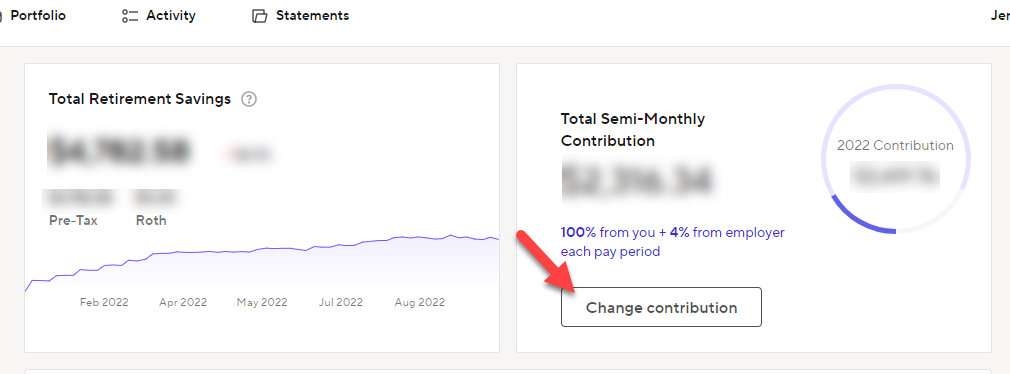
- On the home page, click Change Contribution
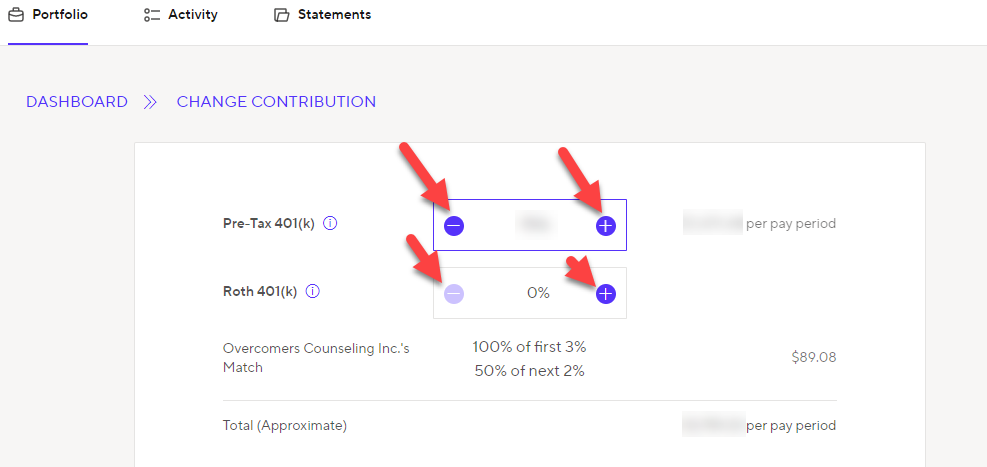
- Click the +/- to change your percentage amount
Summary Annual Reports